
Discount combinations: what combines and what doesn't
Every bundle has a Combine with other discounts setting. It decides whether the bundle’s discount can apply alongside your other discounts.
Combining is a Shopify feature. Lime Bundles sets the rules on the bundle’s discount, and Shopify decides the rest at checkout.
A bundle product has no discount, so this guide doesn’t apply to it.
Change the setting
- Open the bundle in Lime Bundles.
- In the Discount section, find Combine with other discounts.
- Select the edit icon beside it.
- Tick or untick Product discounts, Order discounts and Shipping discounts.
- Select outside the box to close it.
- Select Save.
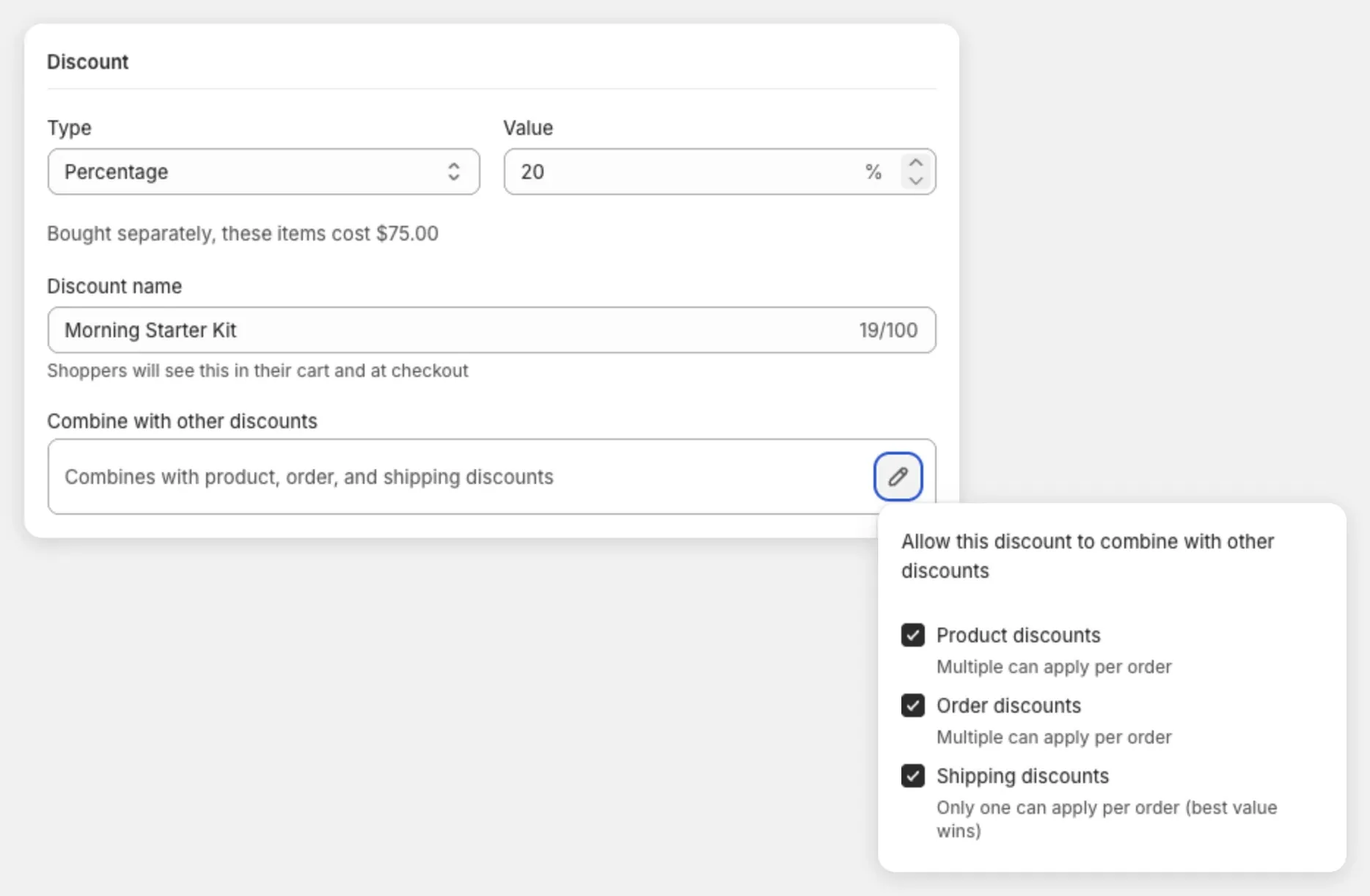
The line in the box sums it up, like “Combines with product, order, and shipping discounts”.
What each option does
- Product discounts: sales on single products. This is also what lets two of your own bundles both keep their discount in one cart.
- Order discounts: an amount or percentage off the whole order.
- Shipping discounts: free or reduced shipping. Only one applies per order.
Untick all three and Shopify applies only the one discount that saves the shopper the most.
New bundles have all three ticked
This is on purpose. Two bundles only combine when both have Product discounts ticked. If one doesn’t, a shopper who adds both bundles to one cart gets only the better discount. The other is dropped, even though the bundle on your store still showed its saving.
The app watches for this. If some of your bundles don’t combine with product discounts, the bundle page lists them by name.
Both discounts have to agree
Shopify only combines two discounts when each one allows it. Ticking a box on the bundle is half the job.
- In your Shopify admin, go to Discounts.
- Open the other discount.
- In its Combinations card, tick the matching option.
- Select Save.
This is the most common reason combining seems to do nothing.
The one thing combining can’t do
Shopify applies only one product discount to each item.
Say your bundle includes a snowboard, and you also run “5% off all snowboards”. Both discounts point at the same snowboard. Shopify keeps the bigger saving and drops the other. Ticking Product discounts doesn’t change this.
What to do instead
To run a store-wide sale on top of your bundles, create it as an order discount.
- In your Shopify admin, go to Discounts and select Create discount.
- Choose Amount off order.
- In Combinations, tick Product discounts.
- Select Save.
- In Lime Bundles, make sure Order discounts is ticked on your bundles.
A worked example
A bundle with 25% off, plus an order discount of 10%, both set to combine:
| 3 items at $18.00 | $54.00 |
| After the bundle discount, 25% | $40.50 |
| After the order discount, 10% | $36.45 |
Both names show at checkout.
Check it worked
Add the bundle to a cart on your store and open the cart or checkout. Each discount that applied shows on its own line with its own name. If you see only one name, the two discounts are competing instead of combining.