
Shoppers can't add large quantities to the cart
If a bundle includes a lot of one product, a shopper may select Add to cart and see a message like this:
Only 50 items were added to your cart due to availability. The bundle needs all its items, so your cart is unchanged.
Their cart is not changed. Nothing is half-added.
Why this happens
Shopify has a store setting called Add-to-cart limit. It limits how many of one item a shopper can add to their cart. Shopify turns it on for newer stores, with a suggested limit of 50.
The message mentions availability, but stock usually isn’t the cause. You can have plenty of stock and shoppers are still stopped at the limit.
The limit is for each item, not for the whole cart. A bundle with 50 of one product and 50 of another is fine. A bundle with 60 of one product is not.
Step 1: Check your limit
- In your Shopify admin, go to Settings, then Checkout.
- Scroll to Advanced preferences.
- Open Add-to-cart limit.
You’ll see if it is on, and the number it is set to.
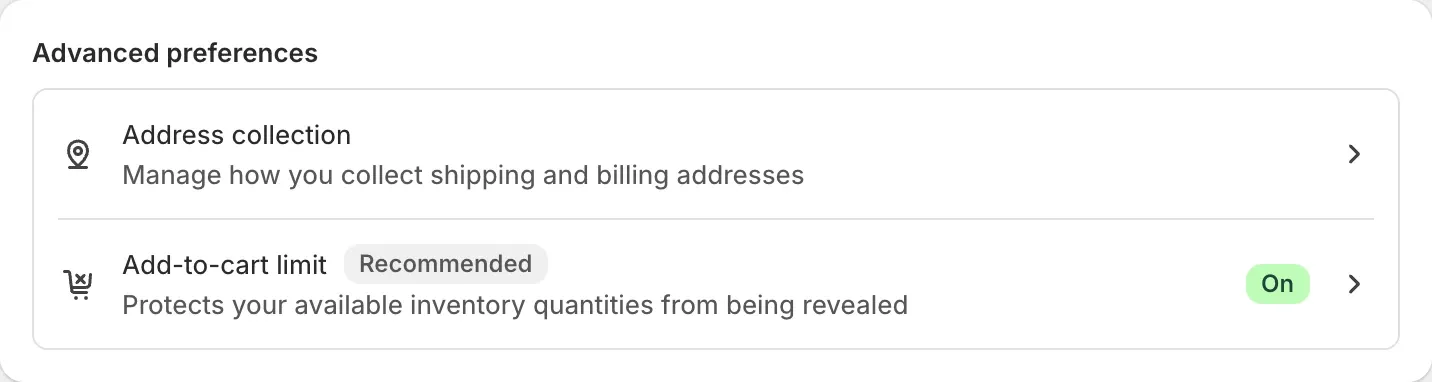
Step 2: Fix it
Choose one of these.
Raise the limit or turn it off
- In Add-to-cart limit, enter a number higher than the largest quantity in your bundle, or turn the setting off.
- Select Save.
Shopify uses this limit to keep your stock levels private from shoppers, so decide with care.
Lower the quantity in your bundle
- In Lime Bundles, open the bundle.
- Lower the product’s quantity to your limit or below.
- Select Save.
Choose this if the quantity was higher than you meant.
Find which product is the problem
The message gives the number that got through, not the product’s name. Open the bundle and look for a product with a quantity above your limit.
Why the cart is left unchanged
When part of a bundle can’t be added, the bundle removes the items that were added. Anything the shopper already had in their cart stays.
A bundle that is only partly in the cart would check out at full price, with no discount. Leaving the cart unchanged is better for your shopper.
Good to know
The first sentence of the message comes from Shopify, so its wording can change with the shopper’s language and your theme.